Home

BGP Configuration (Part 3)

4 Comments

Part 1 and Part 2

Let’s learn about another BGP Features like:

  • Local-AS
  • Next-Hop-Self
  • Backdoor
  • Multihoming (Load-Sharing)
  • eBGP Multi-Hop

======================================

BGP Local-AS

Typically, this feature comes up when ISP A acquisitioning ISP B, but ISP C (or customers from ISP B) doesn’t want to change BGP Peering (change AS again, change neighbor, and so on)
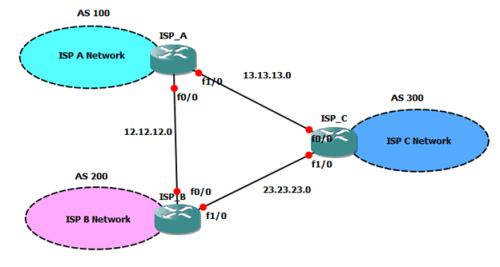
Figure 1. initial network diagram
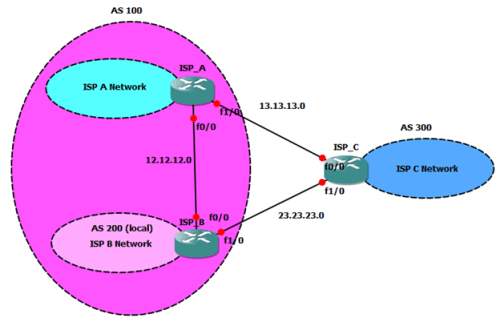
Figure 2. after acquisition form ISP A
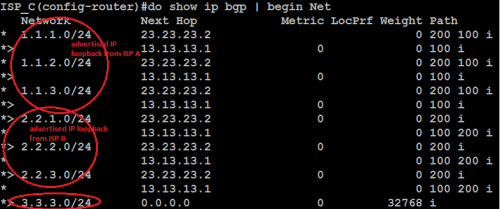
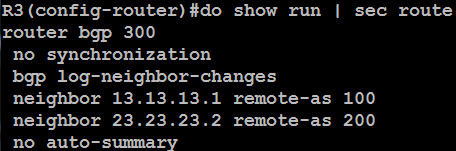
Figure 3. initial BGP network from ISP C point of view

And then…ISP A bought ISP B, therefore all router in ISP B changed into AS 100 (ISP A)…but ISP C doesn’t want to change anything in their routers (too complicated they say…wkwkw)

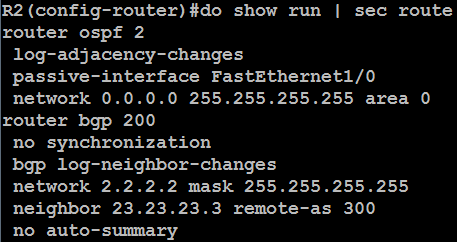
So…let’s configure like this
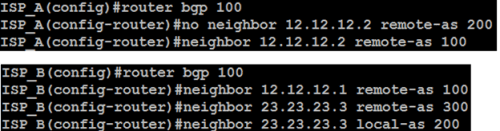
Figure 4. local as configuration

ISP B Router says “I am AS 100 now, but…You (ISP C) can still recognize me as AS 200

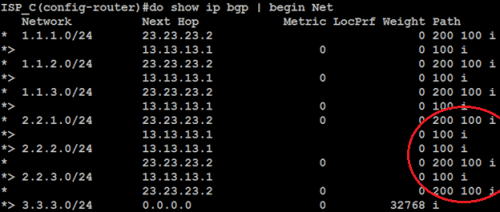
Let’s see in ISP C

Figure 5. ISP C still recognize ISP B AS 200

See…no problem at all, ISP C still thinks that ISP B is AS 200 (even though ISP A Bought it and change that ISP B AS into AS 100)

If, somehow, somebody with directly above your position as engineer say…”remove those AS 200 from the AS-Path, we don’t need it anymore”

Use this at ISP B… neighbor [ip neighbor] local-as [AS] no-prepend

The result is…for example 2.2.1.0 is via AS 100 only

But if you want to change the AS Path from 100 to 200 only, just add “replace-as” beside no-prepend keyword

neighbor [ip neighbor] local-as [AS] no-prepend replace-as

=========================================================

BGP Next-Hop-Self
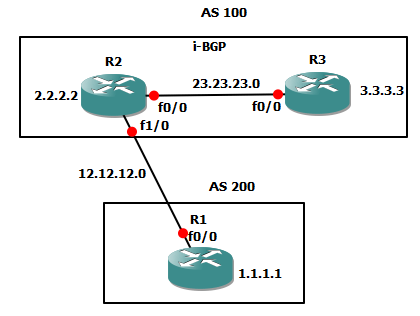
Figure 6. Example topology

One of the BGP rules is “the next hop is always the IP address of the neighbor specified in the neighbor command

R2 learns 1.1.1.1 via R1 through e-BGP, so next-hop to route to 1.1.1.1 in the R2 perspectives is through 12.12.12.1 (fa0/0 R1)

But when R2 advertise the 1.1.1.1 route to R3, R3 learns that next-hop to 1.1.1.1 is through 12.12.12.1 too (which is incorrect, it should be through 23.23.23.2 fa0/0 R2)

Figure 7. from R3
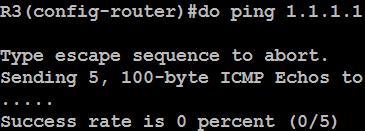
This is where BGP Next-Hop-Self is useful

We told R2 that he must advertise all route he learn, to neighbor 23.23.23.3 (which is R3) with next-hop directed to himself (R2)

Figure 8. change in R3
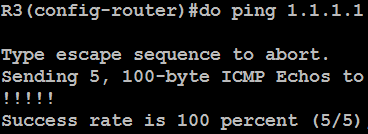
Another mention is when configuring BGP in multi-access network such as Ethernet
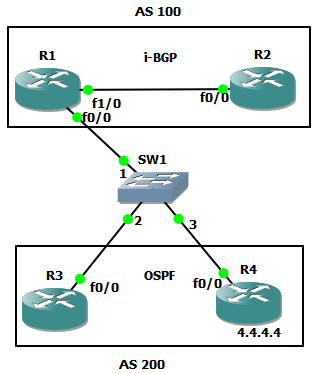
In topology above, R3 advertise 4.4.4.4 from R4 (let’s say acquired via OSPF) to R1

But, instead of advertising 134.134.134.3 (fa0/0 R3) next-hop to R2, R1 advertise next-hop to 4.4.4.4 is via 134.134.134.4 (fa0/0 R4)

Why ? because it make sense that R1,R3, and R4 is in the same network, same directly connected network, therefore R1 choose to most specific one to route

===========================================================

BGP Backdoor
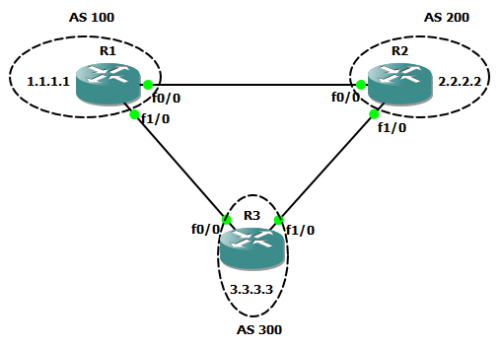

The case is like this, both R1 and R2 run e-BGP to R3, but somehow R1 and R2 run IGP (like OSPF for example)

When R1 want to send packet to 2.2.2.2 (R2), he learn 2 paths

  • Via R2, which is OSPF, with AD 110
  • Via R3, which is BGP, with AD 20 (e-BGP)

The logic is…R1 sent packet via R3…but we don’t want to happen like this way

The solutions are 2 ways:

  • Edit Administrative Distance, which is not recommended
  • Run BGP Backdoor

The initial configuration are like this:
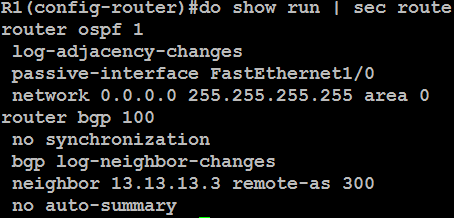
The result of those configurations is
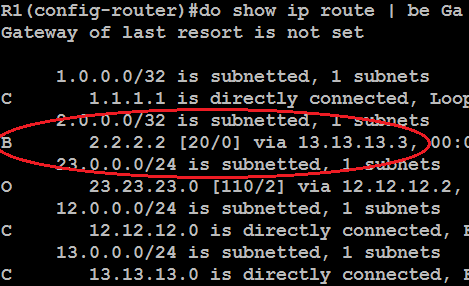
R1 will sent packet to 2.2.2.2 via BGP not directly to R2 because AD difference

Now…lets configure the backdoor command

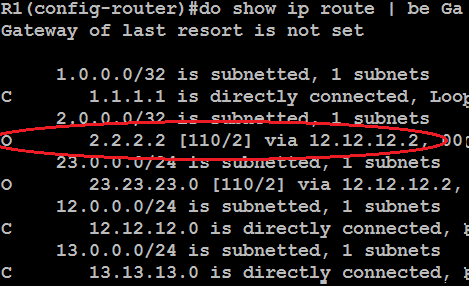
This means…for network 2.2.2.2..ignore the BGP AD, use the IGP AD

Result:
==================================================

BGP Multihoming

Right now we discuss about Multihoming with different AS (configuring multihoming with same AS is not much difference because common e-BGP configuration)

And also Load-sharing it (BGP can’t perform load balancing but it can perform load sharing)

Load sharing
is the ability to split the load (split packet) toward the same destination (host or IP) over multiple paths.

Load balancing
is the ability to distribute incoming/outgoing traffic over multiple paths

(thanks for correction, from Gangga Prima Yousya)
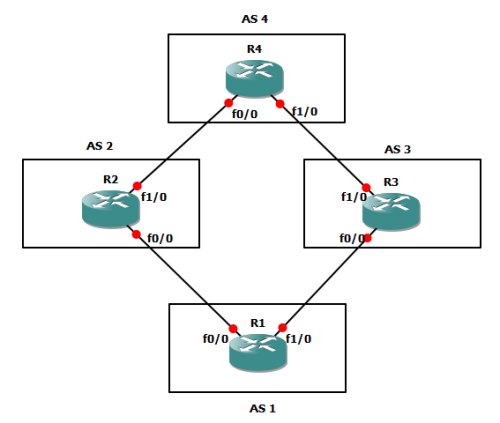
Configure all routers to e-BGP first…don’t forget to advertise 1.1.1.1 on R1 and 4.4.4.4 on R4

Example configuration on R1:
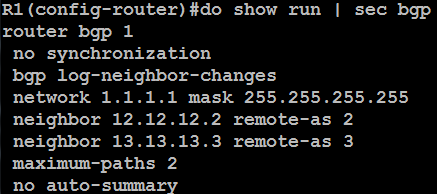
Maximum-path keyword is for load sharing

The result on R1 should be like this

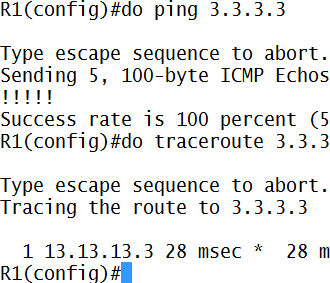
Let’s ping and trace it…
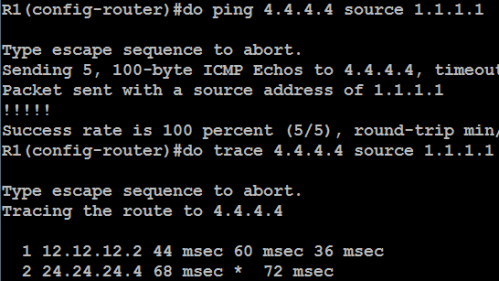
Now we see…even though there are 2 path, R1 BGP only choose the first established one

How can we load-sharing it?!? Here’s the configuration example

Now it can perform Load Sharing

But here is the case I found, if the AS Path taken difference is too far between AS…the traffic load will cause some problem

Let’s see the example

Those configurations is just to simulate congestion that caused by longer AS Path the packet travels
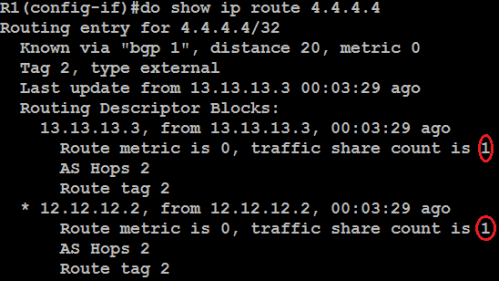
The traffic share is still 1:1, this will cause problem with the packet that take longer path/bandwidth

So let’s configure dmzlink (for load sharing based on bandwidth)
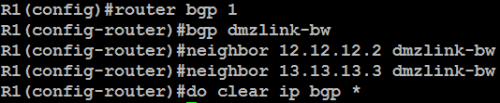
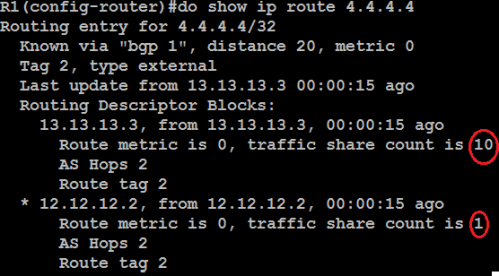
Now the share is 1:10..1 traffic goes to R2 (bandwidth 10000) and 10 traffic goes to R3

Let’s take a look on Router CEF
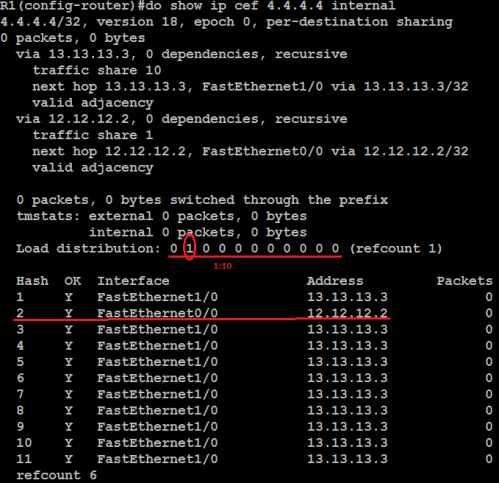
======================================================

eBGP Multihop

eBGP multihop typically used when, somehow, a Router can’t form eBGP peering by connecting directly

so how we configure then?…look at this topology below
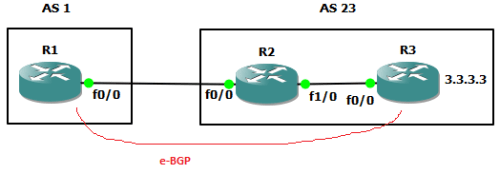
ebgp multihop 1

ebgp multihop 2

why we perform static routing? because initially, eBGP peers must connect directly right?

so…they perform peering via directly connected route in their routing table

that cause us to perform static routing (or via IGP) to make the BGP packet can travel to the other peer…
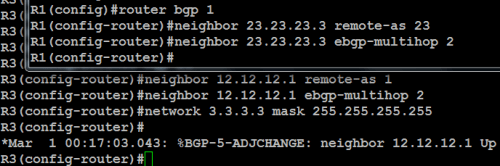
ebgp multihop 3

just look at above configuration…i’m not even touching R2 (except for ip addressing though…)

the keyword is ebgp-multihop

default “hop” for BGP packet is 1…that means BGP packet TTL (time to live) is only travel to directly connected router only

but if we use multihopping, lets say 2…after 1 hop (to directly connected router), that BGP packet have life to travel “one more time”

therefore, BGP packet from R1 (or R3) can reach each other

if we use ebgp-multihop without mentioning the ttl value…default value is 255 (that BGP packet can hop 255 times)

lets verify…

ebgp multihop 4

BGP Configuration (Part 2)

2 Comments

Today…we learn about how to change path the packets travel in BGP environment, in IGP such as OSPF…we can modify the metric or even Administrative Distance (AD)

In BGP we call them Path Attributes…

Some say…Path Attributes in BGP is like Metric in IGP Analogy, Some say…Path Attribute is different at all

All we know is…He’s Called THE STIG !!!

The design we throughout the article is like this

=====================================================

Initial Config

Hey…in R1 and R2 we use network command, but in R3 we use redistribute connected ?!?

I just want to show you that both command function do the same effect…advertise route

But the difference is..Network command do advertise route that we exactly want to advertise

But in redistribute connected, ALL OF CONNECTED ROUTE will be advertised

So which is better ?! of course network command, redistribute make router do processing alot more

Remember, redistribute command is used when we want to “join” different routing protocols right ?!?

========================================================

BGP Route Change with Path Attibute called “WEIGHT”

See the BGP Theory (warning: in Indonesian Language/Bahasa) for the list of BGP Path Attributes

When we see the picture above, AS 1 want to sent packet to AS 3…It send directly to AS 3 (13.13.13.3 – R3)

But lets change it, we want to sent packet to AS 2 first, and then to AS 3

Explanation:

  • We using route-map for setting weight value
  • Default Weight value is ZERO(0)..just check in show ip bgp, and the weight value is defined on Cisco Router only
  • ALWAYS USE route-map in for weight (because we want to “weighten” the inbound interface which is affecting the outbound connection)
  • And then clear ip bgp peering first to see the effect

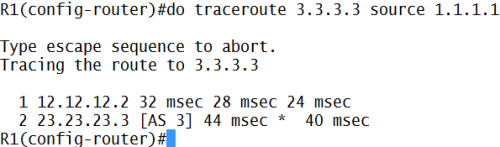
Lets trace it

Done…the packet sent to R2 (12.12.12.2) first, and then to AS 3

Note: why do we have to input trace [ip] source [ip] ?!?

Because if we just trace without defining which interface ip we use, default interface to send is physical one first

Lets see…

Now lets check in R3…is there any route to 12.12.12.2 ?!?

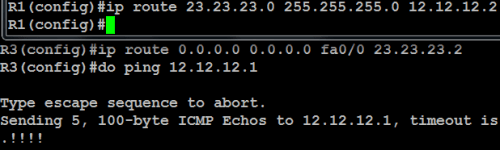
Thats why we can’t ping/trace without mentioning the source ip, because when we configure BGP, we not advertising 12.12.12.0 (using network command) to BGP right ?!?

===============================================

BGP Route Change with Path Attibute called “MED”, ” Local Pref”, and AS PATH”

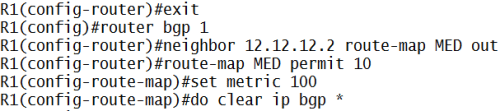
It is the same like weight configuration, just differ in route-map

MED

Local Preference

Explanation:

  • In MED (Multi Exit Discriminator), the lowest one is preferred
  • In Weight and Local Pref, the Heaviest value is preferred

Choosing best route via AS Path

Explanation:

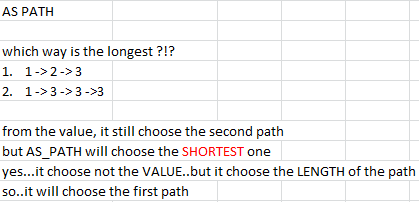
  • AS 1 send packet to AS 3 directly, from AS 1-to-AS 3 (1 -> 3), how do we change it to send via AS 1-to-AS 2-to-AS 3 (1 -> 2 -> 3) ?!?
  • Prepend it !!! (make it longer)…the longer the path, the most unreliable to send packet
  • Lets see the example:

  • from the value ?!? just look at the next hop AS path…after AS 1…to AS 3….isn’t it obvious it will choose the second path ?!?
  • So thats why I’m typing prepend 3 3 3 3 3 (just to make that route longer to read literally, BGP doest read the VALUE of number for AS_PATH selection eventhough the next-hop AS Path is number 3)

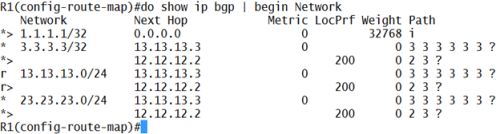
Lets check it…

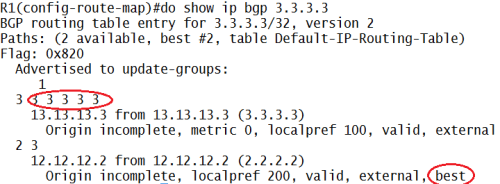
See…the best path to 3.3.3.3 now to R2 then to R3

But we see the 13.13.13.0 and 23.23.23.0 in the show ip bgp 3.3.3.3 also get the same effect, isn’t it dangerous ?!? yes..

Thats why we use another route-map for filtering which AS_PATH get the prepend

now only route 3.3.3.3 that get the prepend effect

Note for BGP MED and Local Pref:

When Local ISP choose the best path/route to another ISP, they use Local Pref

But when Another ISP want to send packet to Local ISP, local ISP can use MED to select which door/route that Allowed for Another ISP

You can say “traffic from Indonesia goes to Singapore first before entering China” (Local Pref, configured in Indonesia)

but traffic from China to Indonesia only accepted if travel to Malaysia first before entering Indonesia” (MED, configured in Indonesia)

we can force to use MED by typing bgp always-compare-med and bgp deterministic-med in router bgp [as] sub-config

Choosing best route via Origin

when the next hop AS Path is same from all direction to destination, BGP choose Origin attribute

Origin means “where this AS Path originally came from

take a look at this pic

ORIGIN X

just look at the origin status code…BGP prefer path from  i-BGP > e-BGP > incomplete

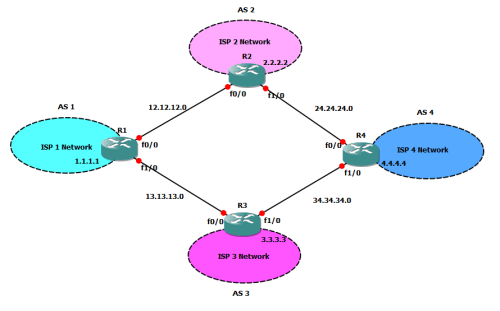
take a look at the new design I draw here…

ORIGIN MAP

R1 want to send packet to 4.4.4.4 in R4

here is the initial configuration (just change the respectives IP in R2, R3, R4)

ORIGIN SHOW IP BGP

from show ip bgp, we know that if R1 want to send packet to 4.4.4.4, He had two options…using AS 2 Route…,or using AS 3 route

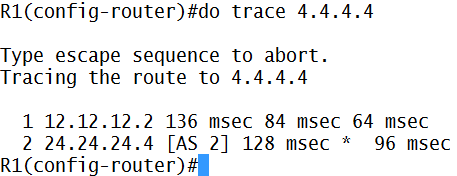
which way does R1 take ?!?

now we trace it…

ORIGIN TRACE 1

why R1 choose AS 2 ?!? because of BGP behavior that cannot perform load balancing, the first one that enter R1 routing table…that is the primary route (I’m configuring AS 2 right after AS 1 configuration is done, thats why R1 choose AS 2)

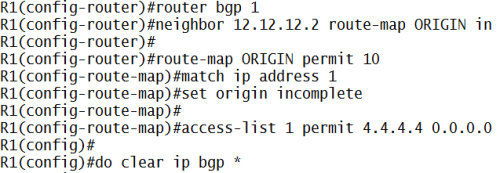
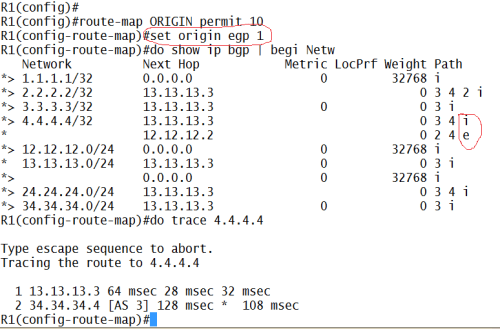
now lets change the BGP Attribute called ORIGIN, lets change AS 2 route become “incomplete” (incomplete means this route came from something others than BGP, such as Redistribution)

ORIGIN CONFIG

Explanation:

  • because AS 2 came from 12.12.12.2 (R2), I use route-map in this neighbor
  • and to forbid anoher network get the “incomplete” status, i’m filtering them using ACL

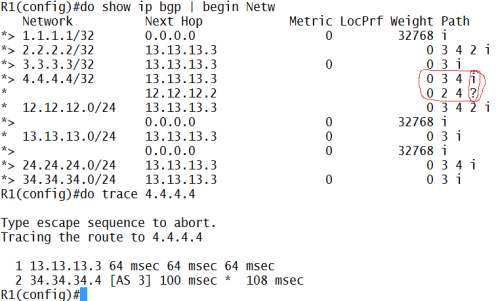
let see the effect

ORIGIN AFTER CONFIG

done…now R1 route to 4.4.4.4 si via AS 3

remember the rules… i-bgp > e-bgp >incomplete (?)

let see if I change AS 2 path to e-bgp origin

ORIGIN AFTER 2

it still chooes AS 3 over AS 2

BGP Route Selection Process in brief:

1. Weight (Cisco Only)

2. Local Preference

3. AS-Path

4. Origin

5. MED (if all of the above requirement is same value)

next…advanced BGP (Insya Allah)

Older Entries Newer Entries