Home

Data Center in Network Perspective (Introduction to Data Center Networking)

2 Comments

Kemaren pernah ngajar CCNA DC…bisa praktek langsung dengan N7k dan N9k

And before this knowledge get lost (from my head wkwkwk)

lets write it down….

Introduction

Dahulu kala…si fulan punya PC
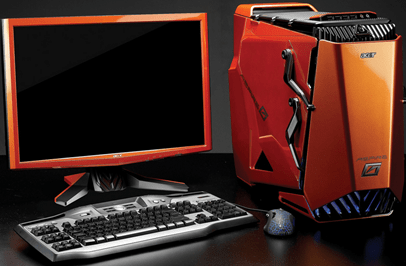
Dia maen game, setel music, sampe nyimpen data2 pribadi (harddisk) disini…

Sampai suatu ketika, harddisk-nya penuh (music, game, atau penuh dengan video2 yang…*ehem*)

Akhirnya…Dia nambah harddisk didalam PC itu…

The questions is… how long it can hold the increasing data? How much harddisk should He bought? Sistem Storage Redudansi-nya seperti apa? RAID 0, 1, 10, 5, 6, atau apa?

Those questions lead us to our old enemies…Scalability and Availability

Klo untuk para Sales sih mungkin tepatnya gambar ini

Note: Harddisk disini means Storage (bahasa newbie: Harddisk, bahasa anak2 DaCen alias data center: Storage)

Nah, harddisk yang terhubung langsung ke device (baik secara external maupun internal) disebut DAS (Direct Attached Storage)

Keuntungan DAS? Simplicity dan speed.

And then…ketika storage di PC tidak mampu lagi untuk nampung data ato harddisk yang dibeli udah penuh, mau beli lagi juga taro di mana karena udah penuh PC-nya, belum lagi processing CPU yang tinggi…itu CPU bukan hanya process aplikasi tapi juga read-write data (yang notabene GEDE datanya)

So, akhirnya dibentuk lah suatu device…khusus untuk nyimpen data, little CPU requirement, hot-swappable (bisa dicopot-pasang/tambah/ganti baru harddisk-nya tanpa harus di restart, baca: upgradeable), daaannnn…bisa diakses dari mana saja (selama ada koneksi kesana tentunya)

Device itu disebut NAS (Network-Attached Storage)

———————————————-

NAS (Network-Attached Storage)
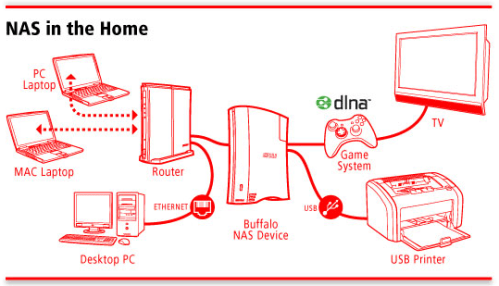
Figure 2. taken from buffalotech.com

Contoh NAS yang lumayan bagus adalah QNAP (bukan promosi)
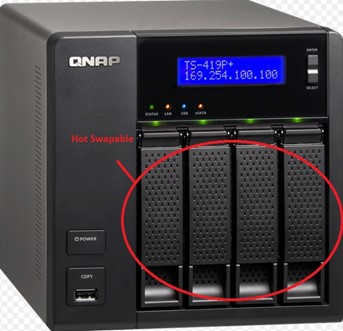
Lu bisa bilang…NAS ini adalah harddisk yang terhubung ke jaringan, klo penuh bisa di tambah, buat backup, dll…tanpa harus matiin PC lu

And theeen…untuk harddisk kita punya solusi…NAS, but what about CPU??

Pernah ga kita mau nyimpen/akses/read/write data, Cuma nunggu lama gara2 CPU lagi proses hal2 tertentu…

Our concern is data transfer rate from CPU to Disk that takes too long to takes place

Jadi ketika data2 yg diproses dari CPU akan disimpan, there must be a disk tentunya (ex: Harddisk/Flash Disk/DVD/etc.)

Nah…kabel2 untuk ngirim data dari/ke CPU, Harddisk, ataupun CD-ROM yang kita kenal contohnya adalah SCSI (small computer system interface), IDE (Integrated Device Electronic, later known as Paralel Advanced Technology Attachment/PATA and then to Serial ATA/SATA)
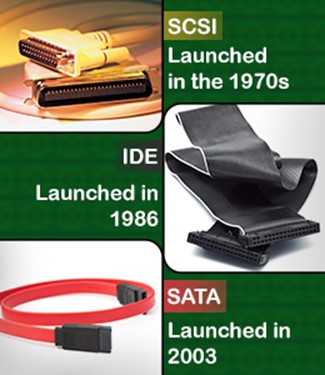
Contoh harddisk parallel:
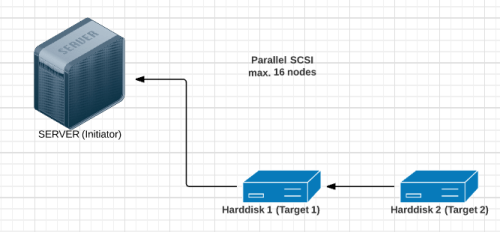
In SCSI, harddisk dinamakan target, Server dinamakan Initiator (di CCNA DC ini pun dibahas)

But there is a limitation about this interface (cable)…SCSI dan IDE contohnya…maximum hanya bisa konekin harddisk secara parallel sebanyak 16 buah (quite a few in Data Center view), and then 1 more concern is…range limitation, maximum cuma 25 meter (CMIIW)

This lead to the next question…bisa ga kita bikin CPU dan Harddisk pun terpisah

Jadi ada “PC A” khusus untuk calculation (processing unit) …dan “PC B” satu lagi khusus untuk naro hasil i/o (storage unit) dari “PC A”

So, finally they made something to separate Server from Storage, they made a network consist of entirely of bunch of harddisks

We call them now as (SAN) Storage Area Network

———————————————————————

(SAN) Storage Area Network
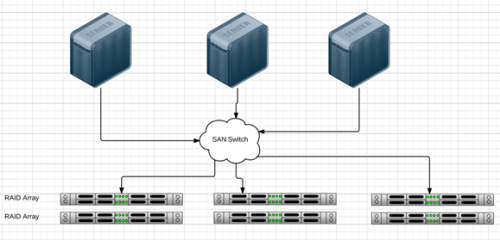
And you guess…” okay, lets place Cisco Catalyst 2960 in the center, and all the harddisk and servers are entirely connected” …you are dead wrong

Because LAN use Ethernet Technologies but SAN use Storage technologies (like SCSI remember?)

Salah satu storage technologies yang popular sekarang adalah FiberChannel (FC) Technologies (alternatively: internet SCSI/iSCSI alias SCSI via IP)

Yup, contohnya adalah Cisco MDS 9000 Series
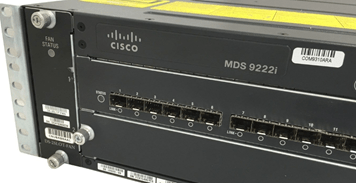
The problem with Ethernet LAN protocol is…It is extremely “chatty”, mau konek aja harus kirim SYN dulu, nunggu SYN+ACK, trus ACK (3-way handshake anyone?!)

Kenapa gitu? Karena LAN protocol itu ngeliat koneksi per-file/per-data yang akan dikirimkan, hal ini yang membuat koneksi LAN punya masalah dalam latency

Anyways…in SAN technologies, mereka butuh koneksi yang melihat dari BIT STREAM alias per-block agar tercipta latency yang rendah

Hence, in LAN, we call protocol for sharing file is File-Based Protocol (CIFS: Common Internet File System – for Windows dan NFS: Network File System – for Linux), semua NAS pake sistem ini (soalnya ini SAN versi Desktop..alias versi murah meriah, bukan SAN versi enterprise yg I/O nya harus tinggi)

But in SAN, we call it Block-Based Protocol (in Cisco Official Course, the strategy for low latency transmission in storage technologies is called Credit-Based Strategy, because transmitter cant send anything before receiver tell transmitter that he can accept another transmission)

And then they came with another IDEA…

There goes FCoE a.k.a Fiber Channel over Ethernet

================================

Fiber Channel over Ethernet (FCoE)

sebenernya ada lagi alternatifnya, yaitu iSCSI (ada beberapa vendor lebih prefer ini, cuma jualannya Cisco adalah FCoE…so, kita bahas FCoE)
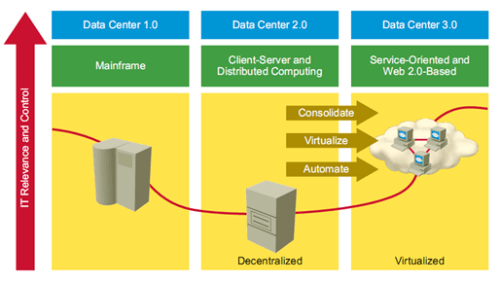
DC 1.0: semua aktifitas ada di server mainframe
DC 2.0: mulai split…client PC jalanin activity, server jalanin process yang diperintah client
DC 3.0: semenjak ada virtualisasi O/S dan SDN…mulai era Cloud alias web-based

Cloud ini apa sih? in my simple terminology…a bunch of storages connected to network, it just new name to that SAN technology to make it seems cool (marketing purposes)
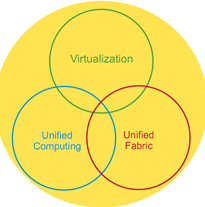
Ada 3 karakteristik Data Center (jualannya sales Cisco wkwk)

  1. Virtualization: bukan hanya OS dan Storage, bahkan Switch Router pun di virtualkan

    Cisco Nexus 1000v adalah flagship Cisco untuk Data Center Virtualization Network Switch…(nyambung ke SDN ini -> SDDC: software defined DC), bayangin…klo kita bisa ngasih QoS marking, VLAN, and all the cisco switch stuffs to the VMs in the server that CANT BE DONE with VMware ESXi vSwitch (virtual switch “generic”, switch virtual-nya VMware)

  2. Unified Computing: punya server yang support untuk virtualization, Cisco UCS (Unified Computing System) adalah contoh Server Cisco
  3. Unified Fabric: support both SAN connection and LAN connection, that is…FCoE in Nexus 5000 series and above

Syarat untuk bisa FCoE ada 2…

  1. binatangnya harus hidup di 2 alam…

    Maksudnya, alat itu bisa running SAN and LAN technologies sekaligus, di Cisco ya N7K yang komplit

  2. Interface ethernet-nya minimum 10gig (masa depan data center itu di Fiber Optic medium…bukan di Copper, pake cahaya gitu loh…)

Yang pasti…harus support jumbo frames…itu kabel udah penuh sesak dengan semua protocol…ya Ethernet, VoIP, VPN Encapsulation, MPLS, ditambah lagi sama FC
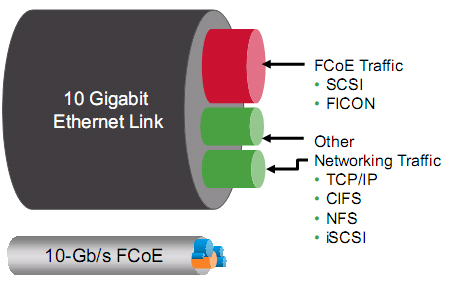
Before FCoE
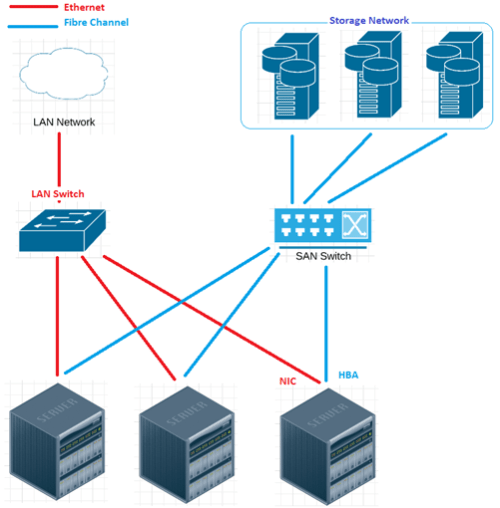
Tiap server “minimum” punya 2 Network adapter…satu buat LAN (NIC Card-Network Interface Card), satu lagi buat SAN (HBA – Host Bust Adapter)

Jadi klo mau koneksi ke LAN/internet…pake NIC, klo mau akses ke storage network…pake HBA

After FCoE
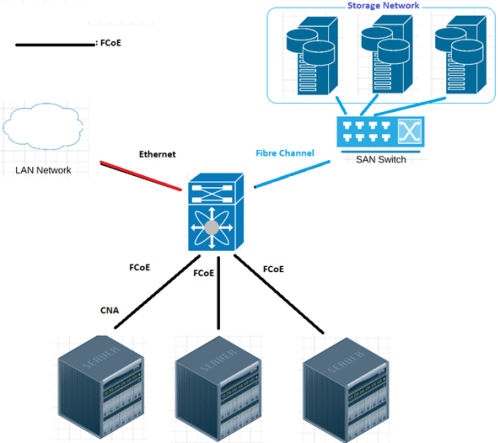
Dengan FCoE, kita ga perlu banyak kabel…semua Unified Fabric (jadi satu semuanya…Ethernet dan FC), klo di Cisco…paling bagus pake Nexus 7000

Trus paling servernya harus punya satu interface card yang bisa jalan 2 technology sekaligus…namanya CNA (Converged Network Adapter)
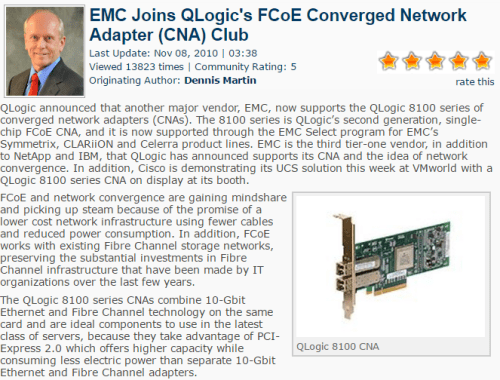
Don’t worry, rata2 server sekarang support semua…

Ada beberapa IEEE Standards untuk FCoE (klo belajar CCNA DC)

  • PFC (802.1Qbb) – Priority Flow Control, klo link congested bisa ngasi sinyal PAUSE ke sender, klo uda lengang nanti dikasi sinyal R_RDY (ready to accept transmission)
  • ETS (802.1Qaz) – Enhance Transmission Selection, ability to share bandwidth intelligently between HPC (high perf. Computing), storage, and LAN traffic
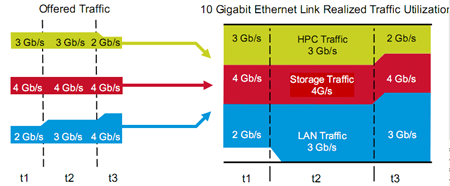
  • QCN (802.1Qau)Quantizie Congestion Notification (QoS)
  • DCBX (802.1Qab)DC Bridging eXchange, kemampuan dia untuk mengenal legacy switch (switch yang hanya bisa LAN)
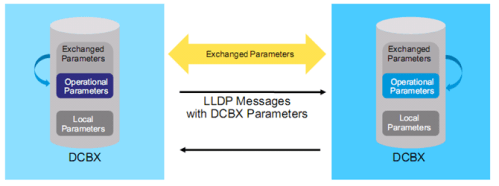
Jadi kek VPN-nya DC
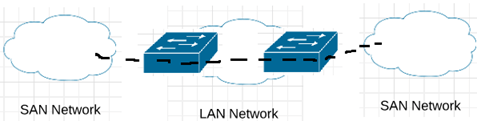
sama kek protocol2 lain, FCoE juga ada prosesnya…namanya FIP (FC initialization protocol), ada discoverynya (FDISC), ada loginnya (FLOGI), bahkan ada kek semacam ip addressing-nya (FPMA dan pWWn)

FCoE process from server (Enode) to Nexus (FCF):
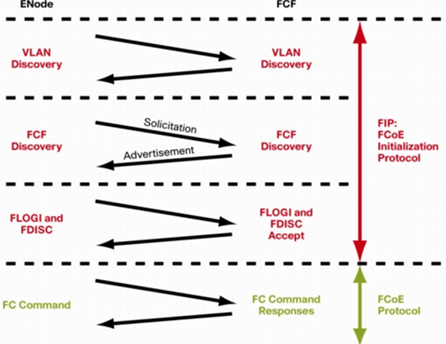
Istilah2 FC:

  1. FIP: FC Initialization Protocol
  2. FC ULP: upper layer protocol
  3. FC LEP: link end point
  4. FCF: FC Forwarder
  5. FPMA: Fabric Provided Mac-Address
  6. FLOGI: FC Login
  7. FDISC: FC Discovery
  8. pWWn: Port World Wide Names

LAST….artikel ini hanya introduction aja, materi prakteknya harus pake Nexus, MDS, dan UCS…

which is…
=============================

References

DAS vs NAS vs SAN Cbtnugget blog @http://blog.cbtnuggets.com/2015/01/storage-mastery-das-vs-nas-vs-san/

NAS on Wiki @http://en.wikipedia.org/wiki/Network-attached_storage

Data Center on Wiki @http://en.wikipedia.org/wiki/Data_center

SCSI vs SATA vs IDE @http://www.buzzle.com/articles/scsi-vs-sata-vs-ide.html

SCSI Cable Length @http://www.tandbergdata.com/knowledge-base/index.cfm/what-is-the-maximum-scsi-cable-length-i-can-use-with-my-tape-drive-autoloader-or-library/

CNA @http://wikibon.org/wiki/v/EMC_Joins_QLogic’s_FCoE_Converged_Network_Adapter_(CNA)_Club

is QCN good for FCoE @http://blog.ipspace.net/2010/11/does-fcoe-need-qcn-8021qau.html

FCoE Initialization Protocol @http://www.cisco.com/c/en/us/products/collateral/switches/nexus-7000-series-switches/white_paper_c11-560403.html

DCICT Cbt Nuggets video by Anthony Sequiera

DCICT Official Course from Cisco Learning Partner
How VPN works (especially site2site one)

4 Comments

Well, another one of my note that left behind, I’ll make sure this one goes to my blog as well…

Gua buat catetan ini karena banyak konfigurasi yang ga ngerti pas lagi buat VPN…

ini command buat apaaa…kenapa harus adaaa…dsb dsb…

Make sure you read my basic VPN article first

———————————————————-

VPN Networking Protocol, the basic

There are 4 main protocols:

  • PPTP (Point-to-Point Tunnel Protocol), metode agar gimana caranya client/workstation bisa konek ke VPN (kek remote VPN gitu)
  • L2TP (Layer 2 Tunnel Protocol), metode agar gimana caranya Main Office Network bisa konek ke Branch Office network via ISP tapi dengan skema IP yang sama/network yang sama (contoh: main network pake IP 10.1.1.0~10.1.1.200, nah branch network tinggal make ip sisanya sampe 10.1.1.254…seakan2 nge-LAN gituh…walaupun beda wilayah)
  • IPsec (IP Security)…metode enkripsi untuk layer 3 (IP – internet Protocol)
  • SSL (Secure Socket Layer)…metode enkripsi untuk layer 4 keatas

Like I said…VPN networking protocol (Layer 3 in OSI Layer)…

The difference? I’ll explain it to you simply in one line: PPTP < L2TP < SSL < IPsec

Yang gunain PPTP rata2 adalah Microsoft Client (using Microsoft Windows Platform) and this protocol is a weak one (but easier to use and configure), link

Yang gunain L2TP rata2 adalah ISP…kelemahannya adalah Layer 3 ga dienkripsi (untuk itu biasanya digabung sama IPsec)

Yang gunain SSL adalah remote user untuk Remove VPN, user2 hanya perlu komputer yang support “HTTPS” (clientless, ga perlu install macem2, cukup browser aja)

Yang terakhir yang paling bagus adalah IPsec (RFC 4301)…jeleknya adalah settingannya aga banyak, plus harus disetting on both side of network, that’s why SSL more preferable in common user

——————————————————————

So…IPsec huh?

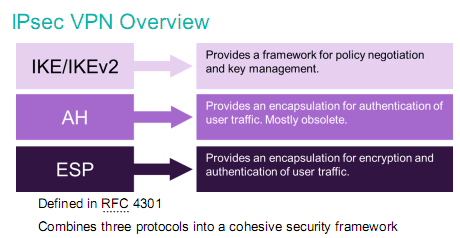
IPsec is quite complex (that’s why it secure…), why?

  • Because there must be some policy how to exchange and manage the key
  • Because there must be some protocol that can authenticate traffic
  • Or, there must be a protocol that CAN both encrypt and authenticate the traffic

From seeing above image, you’ll understand what I mean…

So, dalam membangun VPN terutama site2site…settingan IPsec pasti ada…

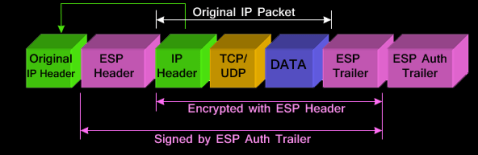
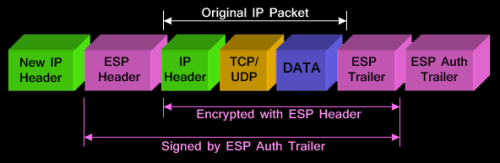
This guy itself support 2 encryption modes:

  • Transport mode: encrypt only payload (data), header ga diutak atik

ipsec-modes-transport-tunnel-3

  • Tunnel mode: default, more secure, header packet (inget…yg CCNA, PDU layer internet apa pada TCP/IP protocol?!?) juga di enkripsi

——————————————————–

Key Management, Policy, and Negotiation

Yup…we’re talking about IKE* (Internet Key Exchange)

Yang namanya VPN pasti ada tuker2an kunci (traffic VPN kan di enkripsi…cara buka-nya gimana…validasi peering VPN-nya juga gimana)

Nah, kita membahas how IKE works…

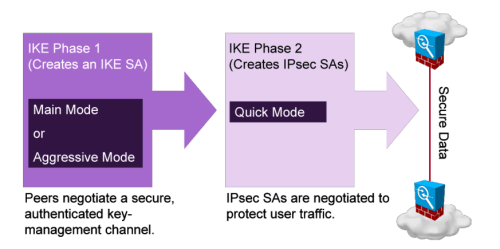
This protocol consist of 2 phase

  • Phase 1 (ISAKMP* Phase):
    • Specify gateway addresses (local ip buat VPN gateway traffic inbound dan remote ip VPN gateway traffic outbound)
    • Specify authentication…mau pake PSK* (pre-shared-key) atau mau pake Digital Certificate* (via CA*/PKI*)
    • Specify NAT-T* (NAT Traversal)
    • Specify Transform-set*
    • Phase 1 ada 2 mode:
      • Main Mode: more secure but slower…commonly used
      • Aggressive Mode: fast without encryption…biasanya klo salah satu IP Gateway ada yang dinamis, contoh:

    • All of those parameter above is called SA*

Don’t worry…I’ll explain those Terminology used in this article on the bottom chapter

  • Phase 2 (IPsec Phase):
    • Specify what traffic/network go through VPN (Access-list anyone?!?)
    • Specify the use of PFS*
    • Specify the proposal
      • authenticate and encrypt the traffic (ESP* – Encapsulating Security Payload)
      • or authenticate only (AH – Authentication Header), better performance-less secure
      • or both of them…AH and ESP (not common anymore, everyone prefers ESP now)
    • Specify Expiry Date…for Key and Session

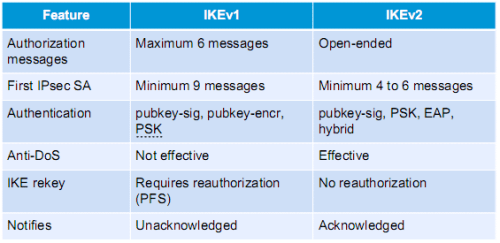
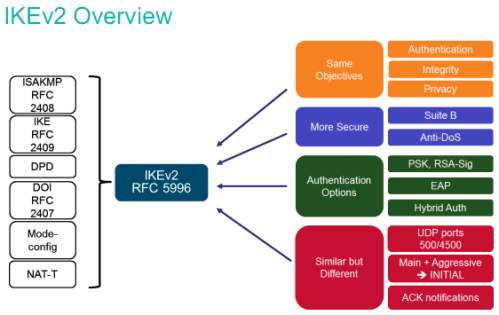
Nah, IKE itu ada 2 versi…versi jadul yaitu IKEv1 dan versi robust and flexible one which called IKEv2

—————————————————————

IKEv1 and v2

IKEv1

  • Defined in RFC 2409
  • Use UDP port 500
  • Using “Phased” approach (ISAKMP – RFC 2408 on phase 1)

IKEv2

  • One of the document is RFC 4306 and RFC 5996
  • Same…use UDP port 500, and port 4500
  • Not backward compatible to IKEv1
  • Using Child SA instead of phase
  • Fewer exchanges data to form than IKEv1
  • Has built-in DPD*
  • Resistant to DoS attack because of cookie mechanism
  • Has built-in NAT-T
  • Can be used with EAP*

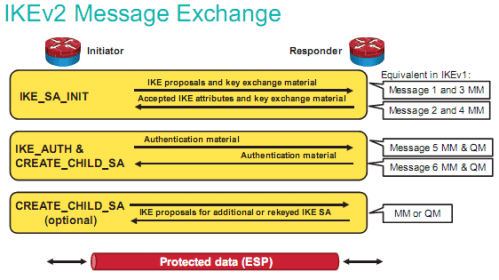
3 steps in IKEv2 exchange messages:

  • IKE_SA_INIT: tuker2 proposal SA sama peer, klo match…ke step selanjutnya (klo di IKEv1, mm-main mode alias phase 1-nya udah 4x bolak balik transaksi peering VPN)
  • IKE_AUTH & CREATE_CHILD_SA: authentikasi peers dan bikin child SA (ini kek Phase 2 di IKEv2, qm-quick mode)
    • CHILD_SA ini berguna untuk notifikasi peer mati, keepalive, authentication message, bikin key baru/rekeying dll
    • Klo ga ada child_sa, berarti balik lagi ke phase 1…repot
    • Ini artinya lebih cepet connect/reconnect-nya

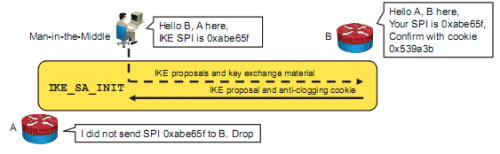
IKEv2 provide better DoS prevention

Di IKE…hacker bisa ngirim SPI* (lets say peer initiation) to victim router with many spoofed IP address, hasilnya…consume CPU resources karena banyak “half open” initiation yang masuk, klo ga ada mekanisme prevention DoS…maka ketika victim router establish connection ke router peer DENGAN SPI/KEY YANG DIKASI HACKER…wassalam, ketauan semua isinya, soalnya hacker bisa generate sendiri key-nya (orang dia yang bikin) plus bisa decrypt traffic pake kunci itu

Di IKEv2, mereka pake cookies pas pertama kali peering VPN (ada semacam fingerprint lah)…jadi klo hacker ngirim SPI intended for man-in-the-middle attack…si victim router tinggal ngomong…”bener ga lu ngirim ginian?
Ke router asli-nya….karena router asli-nya punya cookie pas pertama kali peering…tinggal di cek…klo salah, di drop

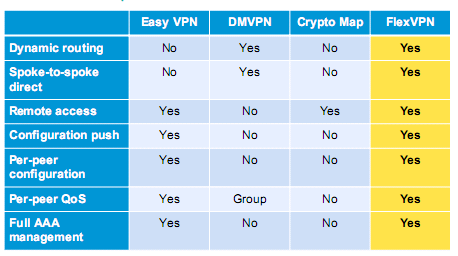
Nah, di Cisco…mereka punya teknologi yang bernama FlexVPN* that relies heavily on IKEv2…

—————————————————————

Terminology

ISAKMP (Internet Security Association and Key Management Protocol): this is a framework…of protocol, kek lu mau masuk ke istana Negara…pasti ada protocol yang harus dipenuhi sebelum lu bisa masuk, nah protocol2 itu kan ga Cuma 1…pasti ada parameter2 lain yang harus dipenuhi. Kumpulan protocol2 ini di VPN dinamakan SA (security association)

Framework: i might have to explain this because I’ve used this words many times…klo protocol itu aturan, nah framework itu adalah kumpulan peraturan2

PSK (Pre-shared-key): think this as a password or key to enter a door…password being said must exactly same like password remembered by door guard (key also…must match in order to unlock the door), lawannya PSK? Digital Certificate

Digital Certificate: tired remembering all the password for site A, site B, site C, and so on…?? Or exhausted from bringing all keys in “Key-chain” to unlock all the doors?…this is the solution, it like ID Card for US…as long as You (as ID Card bearer) and Door Guard recognize the Card (who made it of course) then you ready to go…

PKI (Public Key Infrastucture): this is a framework explaining how to create digital certificate, which mentioned above

CA (Certificate Authority): ini server yang bikin digital certificate, dia yang bikin, dia juga yang verifikasi keasliannya

RA (Registration Authority): ini optional, klo lu mau CA cuma bikin sertifikat dan yang nge-cek validitasnya server lain…si RA ini untuk ngecek validitas certificate-nya

CRL (Certificate Revocation List): ini serial number-nya certificate…di dalemnya ada masa berlaku ini sertifikat (expiry date)

SCEP (Simple Certificate Enrollment Protocol): Cisco punya, kek PKI Framework-nya Cisco…simple, Cuma pake HTTP untuk ngirim dan nerima request dan sertifikat

NAT-T (NAT Traversal): NAT and IPsec is not compatible each other, NAT itu kan ganti IP…jelas akan break salah satu rules dari VPN yaitu integrity (make sure data hasn’t been changed). NAT-T ini bikin header UDP di”depan”nya IPsec…jadi yang dibaca UDP NAT-nya dulu bukan IPsec-nya…both side harus aware klo mereka pake NAT-T (bahasa mudahnya…2-2nya harus dienable NAT-T klo mau pake VPN). Workaround for NAT-T? just use IP PUBLIC on your Firewall/Gateway

SA (Security Association): men-define mau pake apa enkripsinya, integritynya (hashing), bikin key sama tuker2annya mau pake apa

  • Encryption mode: aes, des, 3des
  • Hashing mode: md5 atau sha
  • Key exchange mechanism: DH = diffie-hellman, all variant
  • Expiry date untuk key-nya

Transform Set: isinya adalah metode yang akan digunakan oleh IPsec…mau pake ESP apa AH

PFS (Perfect Forward Secrecy): ensure itu VPN peer ga make key yang sama klo mau bikin session VPN baru

ESP (Encapsulation Security Payload): defined in RFC 4303 using IP Protocol* 50, isinya bagaimana caranya kita bisa authenticate dan encrypt itu traffic lewat VPN

IP Protocol: tipe2 sub-protocol didalam IP itu sendiri, contoh: 50 – ESP, 51 – AH, 46 – RVSP buat QoS, dll…(link)

AH (Authentication Header): more fast but less secure than ESP, only authenticate header with no encryption

DPD (Dead Peer Detection): teknologi untuk memastikan VPN peering kita ga down…kek IP SLA-nya VPN lah (default di IKEv2 sudah bisa setting ginian, ga perlu konfigurasi khusus kek di IKEv1)

EAP (Extensible Authentication Protocol): sebuah framework untuk extend PPP protocol yang mengatur bagaimana caranya mengauthentikasi user (bisa pake password, AAA, LEAP-nya Cisco, EAPOL-nya ethernet LAN, dll)

SPI (Security Parameter Indexes): mekanisme identifikasi SA ke packet yang datang (besarnya 32 bit)

——————–

References:

ISAKMP – https://tools.ietf.org/html/rfc2408

IKE – https://www.ietf.org/rfc/rfc2409.txt

Security Architecture for IP – https://tools.ietf.org/html/rfc4301

IPsec – https://tools.ietf.org/html/rfc4303

IKEv2 – https://tools.ietf.org/html/rfc4306

IKEv2 Updated – https://tools.ietf.org/html/rfc5996

http://www.h-online.com/security/features/A-death-blow-for-PPTP-1716768.html

https://tools.ietf.org/html/draft-ietf-ipsec-ikev2-tutorial-01

http://www.juniper.net/documentation/en_US/junos12.3×48/topics/concept/vpn-security-ikev2-understanding.html

http://security.stackexchange.com/questions/56434/understanding-the-details-of-spi-in-ike-and-ipsec

https://supportforums.cisco.com/document/21746/what-extensible-authentication-protocol

https://en.wikipedia.org/wiki/List_of_IP_protocol_numbers

CCNP Security SIMOS powerpoint slide

Older Entries Newer Entries