

Part 1, Part 2, and Part 3 here
Although there is many bgp keywords/features that i’m not mentioning here, let’s end it with 4 important features left:
- BGP Confederation
- BGP Route-Reflector
- BGP AS Filtering with Regular Expression (Regexp)
- BGP Community
The Wrap-up after I learn a little about this protocol…
“Holy Sh*t…This is the most complex routing protocol I ever learn haha”
============================================
Route Confederation
Remember when we talk about BGP Full Mesh…lets take a look at topology below
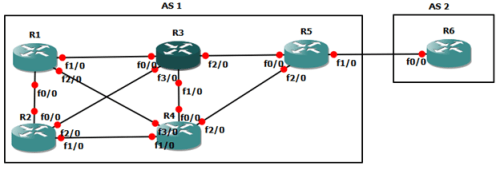
It would be bothersome if we must configure bgp peering one by one right ?
In BGP, one way to avoid this is Route Confederation…we divide one big AS into smaller AS like the topology below
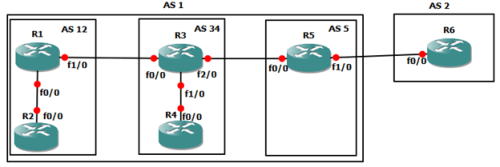
Lets see the configuration on eBGP of AS 1 and AS 2(R5 and R6)
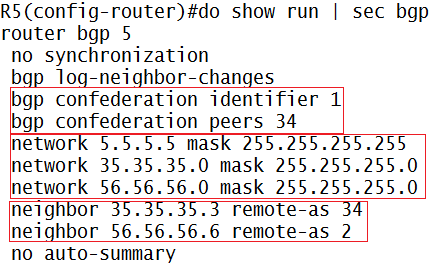
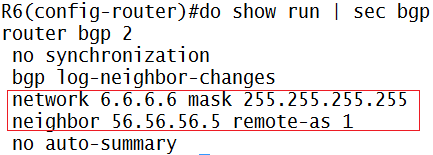
Explanation:
-
In R5:
- Router bgp [sub-AS number]…we don’t configure main-AS as the number in BGP Confederation
- Confederation identifier explain the main AS the router resides
- Confederation peers explain other iBGP sub-AS that directly connected through this sub-AS
- Dont forget to add each neighbors with their respectives number
- Add network keyword to ensure ping successful to R6 in AS 2 from AS 1 routers (if you ping without source)
-
In R6:
- Just common e-BGP peering configuration
After e-BGP peering successful, lets go to other routers


Explanation:
-
In R3:
- Same confederation identifier, to tell this router that he belongs to AS 1 (main-AS)
- Confederation peer with sub-AS 5 and sub-AS 12 as his directly connected sub-AS neighbor
- Dont forget to add each neighbor with their respectives number
- And also next-hop-self (remember part 2 about BGP rules)
- And add the network (just like in IGP configuration) to ensure successful communication between routers
-
In R4
- We only add confederation identifier because R4 achieve confederation peering from R3
- Dont forget about neighbor and also add network like you’ve done in IGP configuration (if you ping without source)
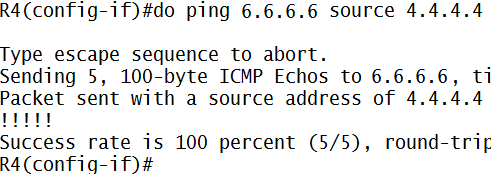
And so on with R1 and R2, the configuration is roughly the same like R3 and R4
==========================================
Route Reflector
Another way aside from Route Confederation is Route Reflector
Route Reflector is more processing friendly, because we can choose some routers to mirror their peering to neighbors
For example, in topology below R4 want to achieve route 3.3.3.3 from R3 but we dont want to connect them directly, we can use route-reflector to achieve this
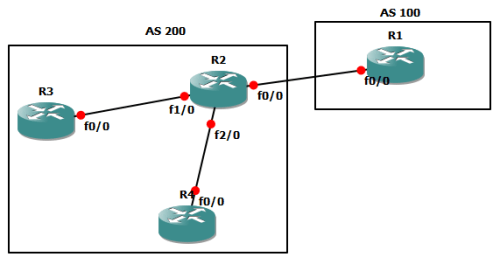
Initial configuration (R1 through R4)
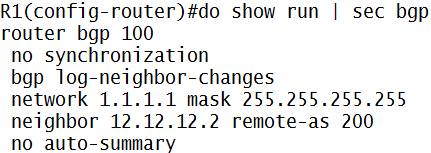
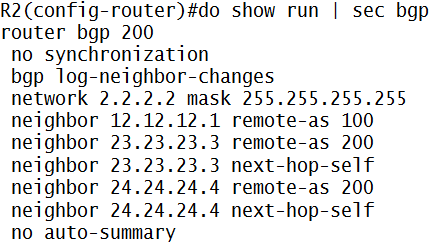
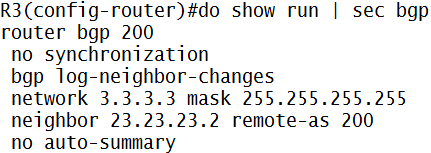
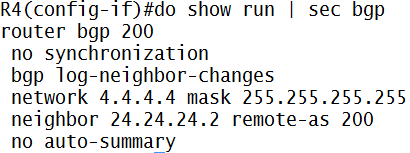
Here’s the initial achieved BGP network in R4 (or R3)
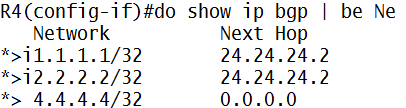
Now we add route-reflector…
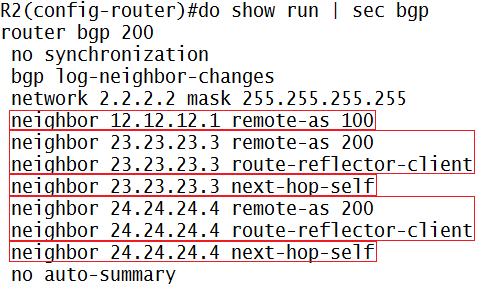
Explanation:
- To achieve route-reflector(mirror)…we need client/mirror to catch
- So we set neighbor R3 (23.23.23.3) and R4 (24.24.24.4) to catch each other via route-reflector-client keyword
Now we look at R4
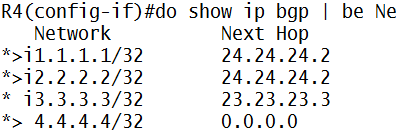
Now R4 (or in R3 respectively) get each other route via mirroring/reflector from R2
=========================================
BGP Route Filtering (Regular Expression/Regexp)
In the real world…one of most useful of regexp implementation is we must filter which AS that we wish to see, because of many ISP network advertised to our router
Here’s is initial show ip bgp with the respective topology
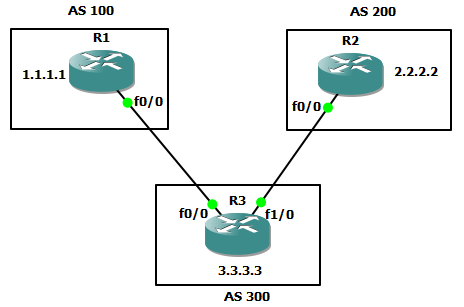

Imagine there is more network to display when we use show ip bgp…
So…we filter using BGP Regular Expression (this feature comes up not only in IP Network…in programming regexp exist too) or just call it Regexp
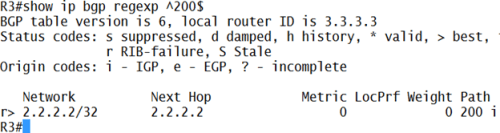
Example…we want to filter only AS 200 to came up in display
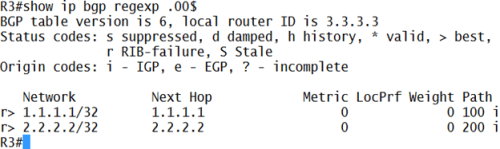
Or we want only AS with the second and third number using 0 (zero) to display
The first one = ^200$
- The “^” mark is to define..”it start with number on the right after this mark”…
- The “$” mark is to define..”it end with number on the left before this mark”…
- So…^200$ means that this regex is filtering AS that start with number 2,0, and then ends with 0
The second one = .00$
- The “.” Mark is to define…”any number”
- So…”.00$” means that any AS-path number can be displayed as long as followed by two 0’s behind
There’s many symbol to use…use this as reference
=======================================
BGP Community
remember BGP Configuration part 2 when we learn about how to change BGP “metric” that called path attribute…
this Community works that way…change path attribute
but…instead of configuring on OUR Router(a.k.a costumer router) solely, we configure it at PE Router (ISP Router)
so…BGP Community works this way: ISP influence costumer router for deciding best path for the route and then reduces costumer configuration on their router
ISP: “hey…i’m tagging 3.3.3.1 network with 12:300 community value…use it accordingly”
Costumer: “ok…for the network that come from ISP with community value 12:300…i will use [insert path attributes here]”
ISP:”new update…there is a new best route, its 3.3.3.3..community value it still the same…use it well”
Costumer:”no problem”
ISP:”guys…there’s…”
Costumer:”Dude !!…as long as community value is still the same, just pass it up here..it’s automatically configured on our router”
let’s see the example
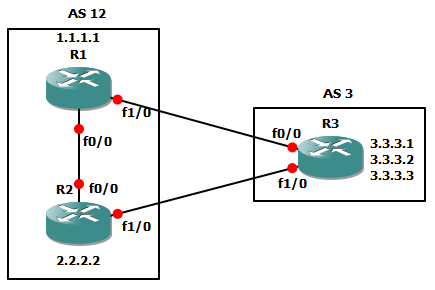
we try to influence BGP path decision (example: local-pref) process from R3 (lets say this is ISP) to R1 and R2 (costumer)
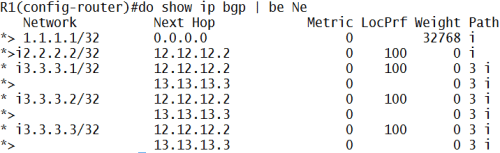
above picture is the initial network advertised to R1 via R3 with default local-pref value (100)
let configure BGP Community on R3 first and then configure on R1 & R2 respectively
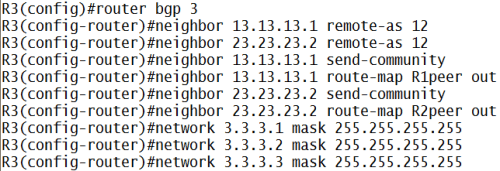
explanation:
- send-community keyword is to make this router send community information to this neighbor
- and then create route-map for each peer (below picture) to set community value and filter which his network get the community with outbound traffic (we want to send the packet right? not receive it)
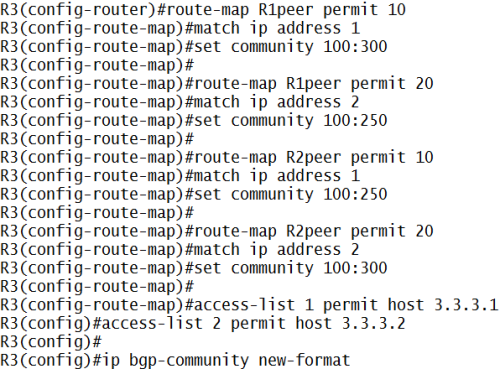
explanation:
- create route-map to permit which network that get the community tag
- and set community tag, there is 2 version…Cisco Version and IEEE version
- if we set, for example, set community 12345…this is Cisco version
- but if we set, set community [AS:Tag Value]…this is IEEE version
- to use IEEE version we must use ip bgp-community new-format
- and then create access-list (below picture) to permit the network that we want to tag with community
- so, for R1 use community value 100:300 to network 3.3.3.1
- but for R2, use community value 100:250 to network 3.3.3.1
- the aim is, if R2 want to send packet to 3.3.3.1, he must not send it directly to R3 (verification at the bottom page)
but hey…above configuration is 100:300 right?? isn’t it should be 12:300??
yes..a typo >_< , initially I want to create AS 100 instead of AS 1
but it doesn’t matter…have s*x…i mean, it still working properly (for now) haha
I honestly dont know why is it working…eventhough the AS is typo
and then…why you use 300 or 250 ?!? that value is just a TAG for community, its free to choose (i think)
now let’s take a look on R1 and R2
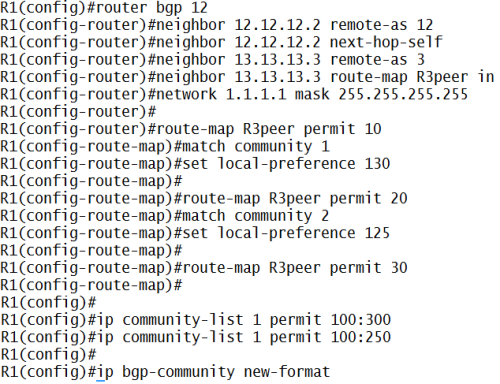
explanation:
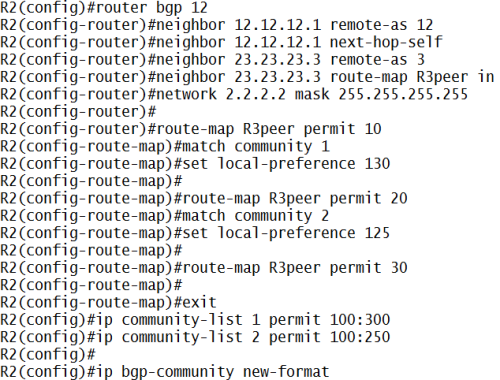
- create neighbor with route-map that use community with inbound traffic (receive packet)
- match it with community ACL, ip community-list [number] permit [community value]
- and if it match, tag it with set local preference [value]
- if we dont use route-map [name] permit 30, all traffic that don’t match with previous route-map will be dropped
- and R2 configuration is roughly the same (below picture)
let’s see the effect:
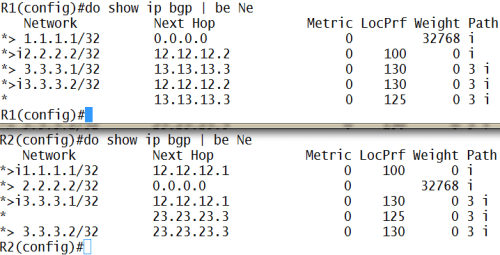
now R1 and R2, based on community value that R3 sent, will react to 3.3.3.1 and 3.3.3.2 route accordingly
let’s trace it…
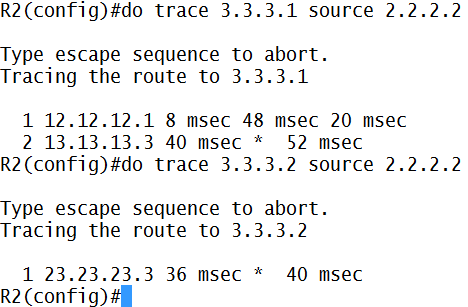
see…R2 send packet to 3.3.3.1 is through R1 (12.12.12.1) first
but to 3.3.3.2…send directly
verification
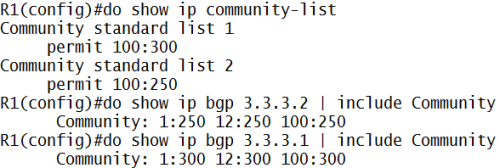
and then, there are special values for community attributes
no_export: do not advertise community to outside AS (remember..community is “transitive-optional BGP attributes”, see BGP Theory)
no_advert: do not advertise to any other peers
local_as: do not advertise outside the local confederation sub-AS
example configuration:

where is the result/effect of this configuration??
later (or not at all), i’m going crazy with all these configuration (now you ask me to add another-AS to see the result @_@)
let’s take a break…if i have free time (and motivation haha), i will post it
ok…done, i’m back with bahasa Indonesia typing again hahaha










 Miftah Rahman (Go)-Blog