Home

Cisco Voice Solution (my notes when taking CCNA Voice)

4 Comments

Figure 1. Cisco Unified Communication Architecture

Cisco Smart Business Communication System (Cisco SBCS)

Apaan ni ?? ini jualannya Cisco…semacam program paket..yang isi nya macem2 (ya IP Phone, Cisco IOS nya, Server…digabung dinamakan Cisco blablabla itu)

Taken from CCNA Voice Quick Reference: “Smart Business Communications System is a group of specially designed, integrated devices that can provide high quality routing, firewall, intrusion prevention, Power over Ethernet, wireless, and many WAN and PSTN connectivity options.”

Cisco SBCS ini typically pake:

  1. Switch: 500-series switches (gambarnya dibawah…yang Cuma ada kira2 8 port….switch kecil)
  2. Software & Application: Call Agent Software (ditanem di router..jadi bisa di configure dari CLI Router ato dari Web-Based kek SDM) can support up to 48 phones dan Voice mail and Auto-Attendant functions are provided by the integrated Cisco Unity Express (CUE) application (di Router)

Cisco provides several options for call agents, matched to the size and requirements of the customer (paket yang ditawarin ada 4 nih):
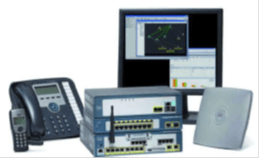
Figure 2. Cisco Smart Business Comm. System

  • Cisco Smart Business Communications System: up to 48 users (untuk small office). The system runs on the Cisco Unified Communications 500 Series for Small Business devices (alatnya liat diatas tuh…ada gambarnya)
  • Cisco Unified Communications Manager Express: up to 240 users and runs on the ISR platforms (Integrated Services Router…Router yang IOS nya uda ada fitur2 Voice nya…nambah biaya lagi untuk beli pastinya…wkwkwk)
  • Cisco Unified Communications Manager Business Edition: up to 500 users and runs as a standalone installation on a 7800-series Media Convergence server (MCS). Isi MCS-nya aplikasi Cisco Unified CM dan Cisco Unity Connection (CUC itu ya isinya fitur mail, voice, messaging, dll…baik hardware maupun softwarenya…satu kesatuan)

Figure 3. Cisco MCS 7845I-3000

  • Cisco Unified Communications Manager(ga pake embel2): can handle 30,000 or more users and runs on clusters of 7800-series Media Convergence servers. (1 business edition = 1 cluster / 1 MCS…banyak cluster = Cisco Unified Communications Manager ^_^V)

———————————–

Apa aja sih aplikasi2 yang bisa kita pake di Cisco Unified Communication ??


Cisco Unified Communication Manager Express (Cisco Unified CM Express)

Apa ini Cisco Unified CM Express ?? ini adalah fitur dari software yang jalan di ISR-series router platforms (including the 800, 1800, 2800, 3800, and 7200-series platforms)

*jangan heran…di dunia jaringan penuh dengan 1001 singkatan…heheheh

Cisco Unified CM Express ini support untuk both H.323 and SIP protocols**, site-to-site connections are possible in a variety of environments. The Unified CM Express system can be set up either as a PBX or a Key switch system, providing customers with a familiar experience that suits their operating environment (jadi bisa di set/dibikin jadi PBX/telepon-analog atau IP Phone)

**H.323 adalah protocol untuk mengalirkan suara, video, dan data lewat jaringan computer…contoh Voice over IP (VoIP)…bagaimana technicalnya (call signaling, controlling, dll)…ga gw bahas disini…1 pembahasan sendiri kek SIP

**SIP (Session Initiation Protocol) adalah signaling protocol untuk mengontrol communication session seperti voice dan video over internet protocol (IP), The protocol can be used for creating, modifying and terminating two-party (unicast) or multiparty (multicast) sessions (ngomong dengan banyak orang)…SIP ini adanya di layer 7 (application layer) jadi mo pake UDP, TCP, SCTP*** dia ga perduli.

***SCTP (Stream Control Transmission Protocol) adalah kek semacam hybrid dari TCP & UDP…metode ngirim paket nya kek TCP (reliable) tapi ga sequential/in order kek UDP…jadi memungkinkan untuk memunculkan image dan text secara bersamaan ke web browser…yang dinamakan multi-streaming (capable of streaming packet in parallel way)

Cisco Unity Express (CUE)

Yaitu software yang ketanem di ISR-Router (bisa diupgrade jadi IVR Router-Interactive Voice Response IOS), bisa sampai 250 user, bisa dibikin jadi buat email, voice mail sampe 250-500 (tergantung beli module yang tipe apa).

Bisa ditanem di AIM Module (Advanced Integration Module) atau di NM (Network Module) module. AIM modules are connected to the main board (Router) as a daughter board addition and use flash memory for greetings and message storage. AIM modules therefore have less capacity for storage. NM modules are inserted into module bays in ISR routers, use a hard disk for greeting and message storage, and have greater capacity for storage than AIM modules.

CUE bisa support 4 sampai 16 sesi telepon2an dan sama kek CUCME…bisa d config lewat CLI atau web-browser. Unity Express can be deployed in conjunction with Unified CM or CM Express and can supplement a full Unity deployment.

Figure 4. AIM Module-CUE

Figure 5. NM Module-CUE

Cisco Unity Connection (CUC)

CUC ini bisa digabung dengan Cisco Unified CM Business Edition, klo digabung..support sampe 500 users, tapi klo jadi standalone…bisa support sampe 3000 users per server (tergantung hardware) bisa digabung dengan Cisco Unity yang lain sampe 10 stack (tipe unity nya apa aja)

Koq bisa ya…klo digabung mala jadi dikit ?!?! klo sendiri mungkin kerjanya ga terbebani dengan proses lain…klo digabung nanti bebatnya berat trus jebol (kaliiii…hahaha)

Cisco Unity

Ini biangnya…dedengkotnya…ini platform nya….support sampe 7500 users per server dan up to 250,000 users in multi-server networked environment (sangat jelas buat enterprise)

Cisco Unified IP IVR

Pertama gw jelasin auto-attendant…apa sih auto attendant itu ??

If you have ever heard: “For service in English, press 1. Pour service en Francais, appuyez sur le 2 . . . ,
“…ini dinamakan auto attendants

Tapi klo banyak yg akses…semuanya nunggu donk…

Typically Call centers that have a high call volume and many possible queues of callers waiting for different agent capabilities can effectively deploy Unified IP IVR to steer callers to the correct agent, prompt-and-collect (“Please enter your 10-digit account number, followed by the # sign”).

Cisco Unified Contact Server

Ada 3 macem:

  • Express = integrated “contact center in a box”…up to 300 agents (call agent)
  • Enterprise = Provides intelligent contact routing, call treatment, network-to-desktop computer telephony integration (CTI), and multichannel contact management. It combines multichannel automatic call distributor (ACD – is a device or system that distributes incoming calls to a specific group of terminals that agents use) functionality. Sophisticated monitoring allows customers to be routed to the most appropriate agent (based on real-time conditions such as agent skills, availability, and queue lengths) anywhere in the enterprise, regardless of the agent’s locationintinya ini super canggih…mungkin Telkom speedy butuh ini kek nya…kadang2 jengkel ama mereka…hahaha (curcol mode: on)
  • Hosted = intinya sama kek Enterprise…Cuma di “outsourcing”…hahaha, bedanya ama enterprise biasa adalah mereka gam au repot ngurus dan maintain itu Aplikasi Contact Server…ya itu..outsource…ke Contact Center Service Provider (ada lagi yaks beginian…ahhaahah)…bukan Internet Service Provider yah…

Cisco Unified Mobility Solutions

  • Cisco Unified Mobility = (a.k.a Single Number Reach) Allows multiple remote destinations (commonly a cell phone, a home office phone, or other work location) to be configured to ring at the same time as the worker’s enterprise desk phone. Thus, when a customer calls your work number while you are on your way to a meeting, your cell phone can ring and you can answer without the customer realizing you are away from your desk. Furthermore, if you return to your desk, you can simply pick up your desk phone and continue the call.

    WIIIH…CANGGIH BENERRR

  • Cisco Mobility Voice Access = inti dari teknologi ini adalah…lo telpon customer pake handphone…tapi pas lo call, lo call ke server dulu (enter number dan access code dulu biar ga disalah gunakan)…nanti server bakal forward call lo ke telepon di desk/meja lo..jadi seakan2 lo nelpon dari meja lo (This is useful not only for presenting the preferred Caller-ID number to the customer, but also potentially for long-distance toll savings)
  • Cisco Unified Personal Communicator = A desktop PC (or Mac) application that combines a software IP Phone, IM client, video, and online collaboration capabilities. Presence indications (“Busy,” “In a call,” “Away,” “Do Not Disturb,” and so on) can save time and enhance productivity because users can see the status of the person they want to contact before trying to reach them. Integration with an Outlook toolbar provides click-to-call or click-to-chat from a message or contact. (kombinasi IM dan Phone…kombinasi Yahoo Messenger dan Telepon)
  • Cisco Unified IP Communicator = A fully functioned software IP Phone, often characterized as a “7970 under glass.” Users can place and receive calls from their PCs from anywhere that connectivity to the call agent can be established. This is typically achieved through a VPN connection; it is perfectly possible to place a call from a airport boarding lounge or your local coffee shop. Unified IP Communicator can be enhanced with Unified Video Advantage, which integrates a PC webcam for video calls.
  • Cisco Unified Mobile Communicator = An application for smart mobile phones that provides access to enterprise directories, presence indicators, secure text/chat, voice-mail access, call history of any of the user’s phones displayed on the mobile handset, and collaboration and conferencing integration with Unified Meeting Place. (di BB ada juga koq..minta Cisco nya tapi…lo bisa liat status dari IP Phone nya dari HP lo…entah itu mail, voice mail, call history, dll)
  • Cisco Unified Presence =
    A server-based application that extends the on/off hook status monitoring capability of Unified CM 6.x to include IM-like status messages. Status indications can be displayed or integrated with Personal Communicator, Mobile Communicator, IP Phone Messenger, the Microsoft Office Connector, and IBM Sametime Communicator

Network Basic Theory 10 (WAN Technology Concept)

Leave a comment

Figure 1. WAN berada di layer 1 & 2

Gw akan jelaskan gambar diatas

Yang bagian kanan adalah ISP Equipment (gw bacanya si…alat2 di HQ / HeadQuarter)

  • Central Office (CO): A local service provider facility or building where local telephone cables link to long-haul, all-digital, fiber-optic (tempat backbone)
  • Local Loop: A local service provider facility or building where local telephone cables link to long-haul, all-digital, fiber-optic (lo bisa baca…kabel dari ISP ke tempat subscriber/konsumen)
  • Demarcation Point: nah…kabel dari ISP kecolok di demarcation point ini…disini tempat alat2 consumen untuk konek ke ISP, taken from Cisco CNAP “demarcation point is A point established in a building or complex to separate customer equipment from service provider equipment. Physically, the demarcation point is the cabling junction box, located on the customer premises, that connects the CPE wiring to the local loop. It is usually placed for easy access by a technician. The demarcation point is the place where the responsibility for the connection changes from the user to the service provider. This is very important because when problems arise, it is necessary to determine whether the user or the service provider is responsible for troubleshooting or repair.” Di demarcation point inilah biasanya ISP Technical Support atau Help Desk bisa bantu

Example:

CustomerAlo….inet gw putus nih

Call Support[segala persyaratan ditanyain]…ok..saya cek yah koneksi ke tempat bapak…

(saat cek koneksi…mereka cek…bisa ga nge-ping dari kantor pusat ke demarcation point…bukan ke computer lo ya…)

(kalau nyambung) Call Supportmap bapak…di kami sepertinya tidak ada masalah

Biasanya akan diikuti oleh kata2 seperti ini, Customereh njing…inet gw mati…ga ada masalah gimana!?!?!” wkwkwkwk

(nah..klo nyambung…berarti dari local loop/kantor pusat ke demarcation point ga ada masalah….masalahnya ada di demarcation point ke modem lo)

Call Supportbaik pak…technical support kami akan membantu bapak dalam 3×24 jam…blablabla

Nah..itu kan kalo nyambung….klo putus??berarti dari ISP nya bermasalah…

Paling Call Support nya bilang gini “baik pak, ada SEDIKIT GANGGUAN TEKNIS dalam jaringan kami…mohon menunggu sebentar” 😀

Yang bagian kiri dari gambar diatas adalah Customer Premises Equipment (CPE): yaitu alat2 dan wiring(kabel2) yang berlokasi di Subscriber/Konsumen, bisa aja alat nya dari ISP atau mereka beli (atau sewa)

  • Data Communication Equipment: Also called data circuit-terminating equipment, the DCE consists of devices that put data on the local loop. The DCE primarily provides an interface to connect subscribers to a communication link on the WAN cloud…yaitu alat2 untuk berhubungan dengan ISP (demarcation point)
  • Data Terminal Equipment: The customer devices that pass the data from a customer network or host computer for transmission over the WAN. The DTE connects to the local loop through the DCE…klo di kita bisa saja ini dikatakan modem

WAN Devices


  • Modem

    Perlu dijelasin ?? ga usa kali ye..gampang ini ma

  • Router

    ’nuff said too

  • Core Couter

    Bedanya ama router biasa adalah router ini adanya di backbone…

  • Access Server

    Concentrates dial-in and dial-out user communications. An access server may have a mixture of analog and digital interfaces and support hundreds of simultaneous users

  • WAN Switch

    Switch di Backbone…biasanya ngalirin data2 Frame Relay dan bahkan PSTN Switch (Telepon)

  • CSU/DSU

    Digital lines, such as T1 or T3 carrier lines (bedanya Cuma dikecepatan doank, T1 = 1,5 Mbps dan T3 = 44 Mbps), require a channel service unit (CSU) and a data service unit (DSU). The two are often combined into a single piece of equipment, called the CSU/DSU. The CSU provides termination for the digital signal and ensures connection integrity through error correction and line monitoring. The DSU converts the T-carrier line frames into frames that the LAN can interpret and vice versa….koq kek modem ya ??emang !!!.The CSU/DSU implements two different functions. The CSU is responsible for the connection to the telecom network while the DSU is responsible for handling the interface with the DTE. Bedanya ama modem2 kebanyakan adalah CSU/DSU mengirim data dalam format digital melalui jaringan telephone digital.

WAN Data Link Concept

Ada 1 lagi…Multi Protocol Label Switching (MPLS)..tapi dibahasnya di CCNP…kita ga bahas MPLS dulu nanti deh ya (MPLS ada bab sendiri hehe)

Gambar diatas adalah diagram frame dari HDLC (salah satu dari WAN Protocol). Examining the header portion of an HDLC frame will help identify common fields used by many WAN encapsulation protocols. The frame always starts and ends with an 8-bit flag field. The bit pattern is 01111110. The address field is not needed for WAN links, which are almost always point-to-point. The address field is still present and may be 1 or 2 bytes long. The control field is protocol dependent, but usually indicates whether the content of the data is control information or network layer data. The control field is normally 1 byte.

Together the address and control fields are called the frame header. The encapsulated data follows the control field. Then a frame check sequence (FCS) uses the cyclic redundancy check (CRC) mechanism to establish a 2 or 4 byte field.

Woke…sekarang kita bahas Opsi2 koneksi dari WAN

Ada 4…Leased Line, Circuit-switched, Packet-switched, dan Broadband

  • Leased Line: tipe koneksi WAN secara private yang dedicated…alias lo bener2 nyewa dari ISP…anggeplah 1Mbps…ya 1 Mbps…1 banding 1 (1:1)…ga di share ama yang lain

    Apa aja yang dibutuhkan untuk Leased Line…

  1. CSU/DSU Device
  2. Serial Cable

Trus apaan tu T3 dan E3 ??…oh..itu Cuma beda tipe kecepatan bandwidth nya aja

*56 & 64 berarti kecepatan

*Huruf T berarti kabel2 standar dari Amerika Utara, Jepang, dan Korea Selatan, Huruf E berarti standar Eropa (beda cara multiplexing nya doank…cara ngalirin listriknya)

*OC means Optical Cable…Fiber Optic let’s say

*J ??ga tau gw…hahahahhah

  • Circuit-Switched: contohnya adalah PSTN (Public Switched Telephone Network…lo bisa bilang ini jaringan telepon lah) dan ISDN (Integrated Service Digital Network…versi digitalisasi PSTN).

    Contoh diatas adalah bagaimana telepon “mengakses” telepon lainnya…dengan cara meng-establish circuit (membangun sirkuit/jembatan antar A dan B…makanya dinamakan circuit switching), jika teleponnya diganti dengan modem…maka computer data bisa di alirkan lewat jaringan telepon ini (contoh: telkomnet instan). Jeleknya circuit switching adalah…salah satu dari circuit yang dilalui data suara putus…putus sudah semua conversation dari telepon A ke telepon B

    • ISDN: is a circuit-switching technology that enables the local loop of a PSTN to carry digital signals, resulting in higher capacity switched connections. ISDN changes the internal connections of the PSTN from carrying analog signals to time-division multiplexed (TDM) digital signals. TDM allows two or more signals or bit streams to be transferred as subchannels in one communication channel. The signals appear to transfer simultaneously, but physically are taking turns on the channel. A data block of subchannel 1 is transmitted during timeslot 1, subchannel 2 during timeslot 2, and so on. One TDM frame consists of one timeslot per subchannel. Salah satu protocol yang memakai TDM adalah PPP. ISDN connection uses 64 kb/s bearer channels (B) for carrying voice or data and a signaling, delta channel (D) for call setup and other purposes.

    • There are 2 types of ISDN interface:
      • BRI Channel: Basic Rate Interface…untuk koneksi rumahan, terdiri dari 2 kabel B dan 1 kabel D (64 kb/s untuk B channel dan 16 kb/s untuk D channel)

        Nah…di BRI Channel Interface…yang D Channel jarang di gunain…jadi kadang2 provider internet make itu channel buat carry data, yang sekarang dikenal namanya X.25 (9,6 kb/s)

      • PRI Channel: Primary Rate Interface…23 kabel untuk B channel dan 1 kabel untuk D channel yang ditotal2 jadi 1,544 Mbps, yang kita kenal dengan T1 (North America). Untuk eropa, Australia, dan beberapa Negara yang lain..pake nya 30 kabel untuk B channel

  • Packet-Switched: data yang dialirkan dari A ke B dipecah2 jadi packet (makanya dinamakan packet switching) lalu dialirkan ke B melalui redundant network…jadi bisa aja suatu data dipecah jadi 3 bagian…bagian A1 lewat jawa, bagian A2 lewat Kalimantan, bagian A3 lewat papua…yang menting nyampe di bali (kira2 analoginya begitu). Path yang diambil tergantung dari switch dan router nya (connection-oriented atau connectionless…inget TCP/UDP !!)…klo di Frame Relay dikenal namanya Data Link Control Indentifier (DLCI…ini istilah TCP untuk Frame Relay).

    Jeleknya apa dari Packet-Switched ini ?? karena paketnya dipecah2….nyampe nya ga bisa di prediksi…Delay, Jitter, dll dah…

    Contohnya Technology nya adalah Frame Relay, X.25, ATM (Asynchronous Transfer Module)…nanti aye jelasin yeee

  • Yang Terakhir adalah…INTERNET !!!: contoh technology WAN-nya adalah VPN..yang bisa di create melalui DSL (Digital Subscriber Line….ADSL..ya speedy noh…ada ADSL ada SDSL), Wi-Fi, Cable (Fiber)
    • A dari ADSL singkatan dari Asymmetric…sesuai dengan ciri2 DSL pada umumnya…kecepatan upstream dan downstream-nya berbeda…klo ADSL Downstreamnya yang lebih gede
    • S dari SDSL adalah Symmetric…opposite dari ADSL…dia upstream nya lebih gede…makanya kurang popular buat dijadiin Internet Service
    • Ada lagi yang namanya VDSL…V for Very High Bit Rate…downstream bisa ampe 52Mbit/s dan 12Mbit/s untuk upstream…Cuma implementasinya mahal (enakan ADSL….murah..untungbanyak), buat dijadiin ISP juga ga cocok..mending Fiber Optic sekalian…ya ga ?!?!?
    • JADIIIII…..DSL itu make kabel telepon….kabel telepon itu dipake buat suara kan ?!? ternyata kabel itu Cuma 10% doank potensi yang dipake….nah..ini dia yang di “exploitasi” oleh DSL…ngalirin data dari internet TANPA harus ganggu data suara

Packet Switching Technologies

Ada 3 yang umum dipakai…X.25, Frame Relay (kita bisa bilang ini anak nya X.25), dan ATM (Asynchronous Transfer Module)

  • X.25: teknologi X.25 menggunakan Virtual circuits (VC) yang di-established melalui network dengan call request packets ke alamat tujuan. The resulting SVC (Switched VC) is identified by a channel number. Data packets labeled with the channel number are delivered to the corresponding address. Multiple channels can be active on a single connection. Aplikasi nyata dari X.25 ini adalah point-of-sale card readers. These readers use X.25 in dialup mode to validate transactions on a central computer. For these applications, the low bandwidth and high latency are not a concern, and the low cost makes X.25 affordable. X.25 link speeds vary from 2400 b/s up to 2 Mb/s. However, public networks are usually low capacity with speeds rarely exceeding above 64 kb/s. UDAH JARANG DIGUNAIN DI NEGARA2 MAJU DAN BERKEMBANG.
  • Frame Relay: mirip kek X.25 tapi channel number nya diganti dengan Data Link Control Identifier (jadi packet nya di-“tag” dengan DLCI layer 2, bukan dari layer 3 lagi)

    Transfer data yang ditawarkan oleh Frame Relay bisa sampai 4 Mb/s. Frame Relay is ideal for connecting enterprise LANs. The router on the LAN needs only a single interface, even when multiple VCs are used (jadi 1 interface bisa banyak DLCI alias banyak tujuan). The short-leased line to the Frame Relay network edge allows cost-effective connections between widely scattered LANs.

  • ATM : singkatan dari Asynchronous Transfer Mode, is a technology capable of transferring voice, video, and data through private and public networks. It is built on a cell-based architecture (sama kek Packet Switching,tapi pemecahan packet2 nya fix / fixed length…makanya dinamakan “Cell”) rather than on a frame-based architecture. ATM cells are always a fixed length of 53 bytes (5 byte ATM header dan 48 bytes ATM payload). Small, fixed-length cells are well suited for carrying voice and video traffic because this traffic is intolerant of delay. Video and voice traffic do not have to wait for a larger data packet to be transmitted.


    The 53 byte ATM cell is less efficient than the bigger frames and packets of Frame Relay and X.25. When the cell is carrying segmented network layer packets, the overhead is higher because the ATM switch must be able to reassemble the packets at the destination. A typical ATM line needs almost 20 percent greater bandwidth than Frame Relay to carry the same volume of network layer data. ATM was designed to be extremely scalable and can support link speeds of T1/E1 to OC-12 (622 Mb/s) and higher.

Broadband Technologies

Nah…kali ini kita akan bahas namanya DSL, Wi-Fi, dan Cable Modem

  • DSL: singkatan dari Digital Subscriber Line, penjelasannya udah diatas tuh. Multiple DSL subscriber lines are multiplexed into a single, high-capacity link using a DSL access multiplexer (DSLAM) at the provider location. DSLAMs incorporate TDM technology to aggregate many subscriber lines into a single medium, generally a T3 (DS3) connection. Current DSL technologies use sophisticated coding and modulation techniques to achieve data rates of up to 8.192 Mb/s.

  • Cable Modem: Technology Cable Modem ini menggunakan Coaxial cable dan widely used in urban areas to distribute television signals. Network access is available from some cable television networks. This allows for greater bandwidth than the conventional telephone local loop (contoh nyata First Media dengan Indovision + FastNet nya). Jadi pengguna TV Kabel bisa akses internet dengan menggunakan kabel TV nya itu (yang dinamakan cable headend). Komponen penting dari headend ini adalah cable modem termination system (CMTS) untuk send dan receive digital cable signal buat internetan

    Taken from CNAP Exploration 4 (1.3.5.1): “Cable modem subscribers must use the ISP associated with the service provider. All the local subscribers share the same cable bandwidth. As more users join the service, available bandwidth may be below the expected rate

  • Wi-Fi: singkatan dari Wireless Fidelity, ada 3 tipe Wi-Fi (kata Cisco sih)
    • Municipal Wi-Fi: wifi di kantor, di rumah, di gedung2, antar gedung, atau 1 kota
    • Satellite Internet: ini dia….yang paling canggih…Internetan pakek satelit wkwkwk. Untuk bisa internetan pake teknologi ini diperlukan parabola (ya iya laaa), 1 parabola alias satellite dish bisa untuk upload ato download…upload nya sekitar 1/10 nya download
    • WiMax: Wordwide Interoperability for Microwave Access, teknologi terbaru nih…denger2 waktu aceh tsunami, akses teknologi nya pake ini nih…IEEE nyebut ini dengan kode 802.16, yang pasti sih WiMAX operates in a similar way to WiFi, but at higher speeds, over greater distances, and for a greater number of users. It uses a network of WiMAX towers that are similar to cell phone towers. To access a WiMAX network, subscribers must subscribe to an ISP with a WiMAX tower within 10 miles of their location. They also need a WiMAX-enabled computer and a special encryption code to get access to the base station.

Dan yang selanjutnya adalah….VPN

VPN singkatan dari Virtual Private Network, A VPN is an encrypted connection between private networks over a public network such as the Internet. Instead of using a dedicated Layer 2 connection such as a leased line, a VPN uses virtual connections called VPN tunnels, which are routed through the Internet from the private network of the company to the remote site or employee host. To address security concerns, broadband services (ISP) provide capabilities for using Virtual Private Network (VPN) connections to a VPN server, which is typically located at the corporate site.

VPN Benefits:

  • HEMAT, teknologi VPN memungkinkan organisasi untuk menggunakan internet secara global dan terkoneksi ke remote offices atau remote user ke main corporate site, thus eliminating expensive dedicated WAN links and modem banks.
  • Keamanan/Security, VPNs provide the highest level of security by using advanced encryption and authentication protocols that protect data from unauthorized access.
  • Scalability, Because VPNs use the Internet infrastructure within ISPs and devices, it is easy to add new users. Corporations are able to add large amounts of capacity without adding significant infrastructure.
  • Compatibility, VPN technology is supported by broadband service providers such as DSL and cable, so mobile workers and telecommuters can take advantage of their home high-speed Internet service to access their corporate networks. Business-grade, high-speed broadband connections can also provide a cost-effective solution for connecting remote offices.

VPN ada 2 tipe

  • Site-to-Site VPN


    Diliat dari gambar diatas, Site-to-Site VPN konek dari satu network ke network yang lain (contoh HQ ke Branch atau sebaliknya). Each site is equipped with a VPN gateway, such as a router, firewall, VPN concentrator, or security appliance.

  • Remote-Site VPN


    Remote-access VPNs enable individual hosts, such as telecommuters, mobile users, and extranet consumers, to access a company network securely over the Internet. Each host typically has VPN client software loaded or uses a web-based client. (biasanya ada software VPN buat client konek ke Office atau lewat web-based client)

Yang terakhir akan kita bahas adalah…Metro Ethernet

Singkat kata….Metro Ethernet itu istilah Ethernet yang dipakai “melampaui batas”… By extending Ethernet to the metropolitan area, companies can provide their remote offices with reliable access to applications and data on the corporate headquarters LAN. IP-aware Ethernet switches (switch layer 3 / multi-layer switch) enable service providers to offer enterprises converged voice, data, and video services such as IP telephony, video streaming, imaging, and data storage.

Benefits of Metro Ethernet include:

  • Reduced expenses and administration-Metro Ethernet provides a switched, high-bandwidth Layer 2 network capable of managing data, voice, and video all on the same infrastructure. This characteristic increases bandwidth and eliminates expensive conversions to ATM and Frame Relay. The technology enables businesses to inexpensively connect numerous sites in a metropolitan area to each other and to the Internet.
  • Easy integration with existing networks-Metro Ethernet connects easily to existing Ethernet LANs, reducing installation costs and time.
  • Enhanced business productivity-Metro Ethernet enables businesses to take advantage of productivity-enhancing IP applications that are difficult to implement on TDM or Frame Relay networks, such as hosted IP communications, VoIP, and streaming and broadcast video.

Important Note: Ethernet dalam istilah Computer Network (IEEE 802.3) adalah teknologi layer 2 (data link) untuk menghantarkan data dalam bentuk frame dalam suatu Local Area Network (LAN) dengan membaca MAC Address , jadi bukan istilah buat kabel, alat, atau mesin seperti yang orang2 awam bilang

Choosing Connectivity

  1. Untuk tujuan apa?

    Do you want to connect local branches in the same city area, connect remote branches, connect to a single branch, connect to customers, connect to business partners, or some combination of these? If the WAN is for providing authorized customers or business partners limited access to the company intranet, what is the best option?

  2. Ruang Lingkup Geografis / Didaerah mana?

    Is it local, regional, global, one-to-one (single branch), one-to-many branches, many-to-many (distributed)? Depending on the range, some WAN connection options may be better than others.

  3. Kebutuhan Traffic-nya seperti apa ?

    Contoh: if you want to transfer video…the ATM technologies seems to be the best choice, for speed…maybe fiber opfic suit the requirement

  4. Private or Public Network ?
    1. Private: dedicated or not?
    2. Public: tipe VPN kek apa yang mau di bikin?
  5. COST !!

    Pasti lah….

Older Entries Newer Entries